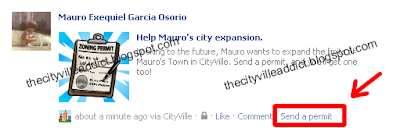
This trick is to get many CityVille Hardware Stores FREE without having to pay or make difficult things. Building Hardware Stores have several more opportunities to get building materials and especially urban permits that are so important.
I give you instructions to perform this trick. PLEASE read the post well it's well explained, more simply can not do, PAY ATTENTION to what we write that well understood.
You will need:
Google Chrome (WITHOUT CHROME NOT WORK!) - DOWNLOAD A secondary account (or can ask a neighbor for help)
Cityville Tricks: Getting the Hardware Store
1 - You first have to enter THIS LINK FROM GOOGLE CHROME
2 - In the form of asking for help have to click the right mouse button and choose Inspect element. If that option does not appear (Inspect element) is because you are not using Chrome!
3 - Now you'll see a lot of code, you have to scroll up a bit until you see a code starting with <form action="http://fb-client…
4 - Please click the right mouse button on that block of code and choose the Edit Attribute
5 - now enables them to edit code, find where it says energy_3, delete it and change it to this: bus_hardwarestore and press ENTER.
6 - Close the window with the X code that comes up on the left or right.
7 - Now select the friend they want to ask the item (can be a secondary account orask you to help a friend.)
8 - send aid as they normally do and when the neighbor will accept the Hardware Store in the inventory.
9 - To accept the item is very important to do so from the window of requests IN THE GAME, NOT in the Facebook applications page. If you don't do this NOT going to work. Accept from the game as seen an the picture below:
Next, Help them out and enjoy your free Hardware Store!


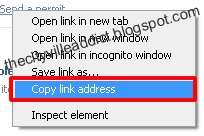
 2. Once published, go to the wall and find it, then right click on the link that says Send a permit and select "Copy link address" (change in every browser, this example is in Chrome)